This tool turns a simulation you describe in plain words into a working model that runs in your web browser, where you can step through it, compare settings and download the results, with the help of any AI assistant.
Role of computational simulations in organizational research
Computational simulations allow us to understand what happens when agents (e.g. types of organizations, or members with them) with different beliefs, incentives, heuristics etc. interact with one another over time — yielding insights into complex organizational dynamics which would otherwise be intractable.
These simulations follow a fairly standard format, as described in Puranam, Stieglitz, Osman & Pillutla (2015), and as prompted in the five questions below. Anything you leave out, the AI assistant will set to a usual value and tell you what it chose.
Classroom suggestion: include an AI agent
Your model can be any model of organizational learning. We suggest including AI as an agent (or several agents) alongside the human agents. Consider what type of organizational context AI is used in, and how each type of agent is likely to interact with the others. If you include one, the explorer can run your model with the AI and without it, and overlay the two.
In the AI boxes, say:
- what the AI can see that a human cannot;
- how it decides or recommends;
- whether and how it can be wrong;
- how the human agents respond to it;
- whether it changes over time.
Usually the same human agents doing the same task alone, with everything else unchanged. Say so, or say what differs.
Outcome measures are automatically defined
Every explorer shows the same things over time: the performance of the system (how well the agents are doing at the task, averaged over agents), and, where it applies, the heterogeneity of the agents (how different they are from one another). With an AI agent, the assistant may add one chart about the AI itself (how many follow it, how accurate it is).
These are a starting point, not a limit. If you want to measure something else, or something more, say so to the AI assistant in the chat, before or after it writes your model, and it will change the charts.
This is not sent to the assistant, so it cannot shape the code. It is saved with your answers, so you can compare it with what you actually see.
References cited in the questions
Anjos, F., & Reagans, R. (2013). Commitment, learning, and alliance performance: A formal analysis using an agent-based network formation model. The Journal of Mathematical Sociology, 37(1), 1-23.
Denrell, J., Fang, C., & Levinthal, D. A. (2004). From T-mazes to labyrinths: Learning from model-based feedback. Management Science, 50(10), 1366-1378.
Denrell, J., & March, J. G. (2001). Adaptation as information restriction: The hot stove effect. Organization Science, 12(5), 523-538.
Fang, C., Lee, J., & Schilling, M. A. (2010). Balancing exploration and exploitation through structural design: The isolation of subgroups and organizational learning. Organization Science, 21(3), 625-642.
Knudsen, T., & Srikanth, K. (2014). Coordinated exploration: Organizing joint search by multiple specialists to overcome mutual confusion and joint myopia. Administrative Science Quarterly, 59(3), 409-441.
Koçak, Ö., Levinthal, D. A., & Puranam, P. (2023). The dual challenge of search and coordination for organizational adaptation: How structures of influence matter. Organization Science, 34(2), 851-869.
Levinthal, D. A. (1997). Adaptation on rugged landscapes. Management Science, 43(7), 934-950.
Levinthal, D. A., & Workiewicz, M. (2018). When two bosses are better than one: Nearly decomposable systems and organizational adaptation. Organization Science, 29(2), 207-224.
March, J. G. (1991). Exploration and exploitation in organizational learning. Organization Science, 2(1), 71-87.
Puranam, P., Stieglitz, N., Osman, M., & Pillutla, M. M. (2015). Modelling bounded rationality in organizations: Progress and prospects. Academy of Management Annals, 9(1), 337-392.
Rivkin, J. W., & Siggelkow, N. (2003). Balancing search and stability: Interdependencies among elements of organizational design. Management Science, 49(3), 290-311.
Siggelkow, N., & Rivkin, J. W. (2005). Speed and search: Designing organizations for turbulence and complexity. Organization Science, 16(2), 101-122.
Build it and run it
Download one prompt, talk it through with an AI assistant, then run the code it writes, online or offline.
1. Download your prompt
Your answers and the assistant's instructions, in one file.
You have not answered any of the five questions. The assistant would make most of the choices itself and will likely build something close to the example in the prompt (people searching for a good project, with an AI advisor).
Show your answers as they will be sent
2. Talk to your AI assistant
- Open a new chat in any AI assistant (Claude, ChatGPT, Gemini…). Upload
my_prompt.md, or paste its text, and send it. - The assistant may ask up to six short questions about things your answers left open. Answer in plain words. “You choose” is a fine answer; it will tell you what it chose.
- Check its summary of your model and correct anything wrong.
- Once you confirm, it writes the complete model,
model.js, as one block of code, followed by how to run it and what it assumed. Copy the whole code block, or download themodel.jsif offered.
3. Run it: online or offline
The explorer is a web page that runs your model. It looks like this:
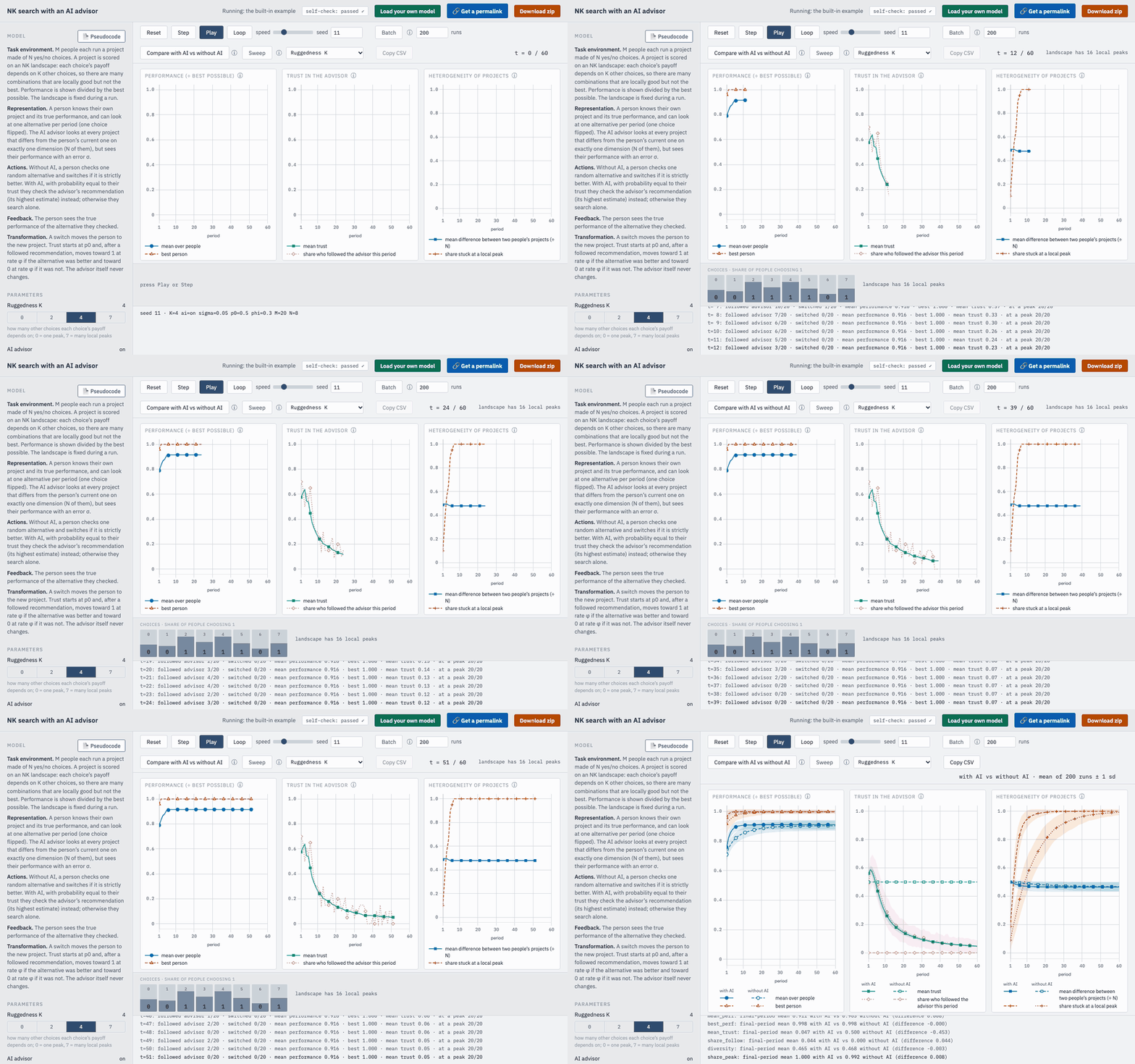
Run yours in one of two ways.
3A. Online, in your browser
- Open the online explorer.
- Press Load your own model (top right), paste the code and press Load pasted code. Got a file instead? Press Choose model.js file.
- To save a copy on your computer: press Download zip (top right), then Make zip. The zip holds your code, every run's numbers, the charts and the settings, plus an
index.htmlthat runs your model on any computer. - To share it or open it elsewhere: press 🔗 Get a permalink, then Make the permalink.
🔒 Only you can see the model you load. It runs in your browser and is not uploaded; anyone else who opens the explorer’s URL still sees the built-in example. Your browser remembers your model until you press Use built-in model or clear its data. The one exception: if you make a permalink, anyone you give it to can open your model too.
3B. Offline, from a folder on your computer
Keeps your model off the website entirely.
- Download the explorer folder and unzip it.
- Save the code as
model.jsin that folder, replacing the existing file. - Double-click
index.html. - To save your results: press Download zip (top right), then Make zip.
- To share it or open it elsewhere: send the whole folder (zipped). The other person opens
index.htmlin it.
4. Check it, explore it, refine it
- self-check: passed ✓ means the model is running seamlessly. If it says self-check: 1 failed ✗, click it, press Copy report, paste the report to the assistant with “please fix this” and run the version it gives you the way you ran the first.
- Explore it: change the parameters on the left, then press Play to watch one run, Batch to average many runs, or Sweep to see how the outcome changes across the values of one parameter. If your model has an AI, Compare with AI vs without AI overlays the two. To see what a button does, hover over it or press the ⓘ beside it.
- ⚠ Caution: In order to get the model up and running, AI will take (grounded) liberties with anything that has been underspecified. Be sure to check the 📄 Pseudocode (next to Model, top left of the explorer) to ensure the model in fact behaves as you intended.If the agents do something you did not intend, tell the assistant in the same chat (“when an agent ties, it should stay, not switch”). Run each new version the way you ran the first.
Full repository: github.com/lynjfu/sim-explorer.